
Introduction
You’ve poured hours, maybe even months, into creating your Unity game. Every line of code, every sprite, and every mechanic reflects your vision.
But here’s the truth: even the most innovative game can feel unfinished if it lacks polish or struggles with performance. That’s where the real magic happens.
This Indie Developer Guide to Polishing and Optimizing Unity Games is designed specifically for creators like you, small teams, solo developers, and ambitious indie studios who want their games to feel professional, smooth, and memorable.
From optimizing performance and reducing lag to refining visuals, audio, and gameplay, every tip in this guide empowers you to transform a good game into a great one (Polishing and optimizing Unity games).
By the end of this guide, you won’t just know how to fix bugs or squeeze out a few extra frames per second; you’ll have the tools, techniques, and mindset to deliver a polished, optimized, and player-loved experience, even as an indie developer. Let’s take your Unity game from “playable” to “unforgettable.”
Understanding the Importance of Polishing
In game development, coding a playable game is just the first step; true success comes from understanding the importance of polishing.
Polishing transforms your project from a rough prototype into a seamless, engaging experience that players remember.
It’s not just about graphics or sound; it’s the small details, smooth animations, intuitive controls, balanced gameplay, and optimized performance that create a professional feel.
For indie developers, mastering polish can make the difference between a game that fades into obscurity and one that earns glowing reviews and loyal fans (Polishing and optimizing Unity games).
By focusing on refinement, iteration, and player experience, you elevate your Unity game from functional to exceptional, proving that even small teams can achieve AAA-level quality.
Optimizing Performance in Unity
For indie developers, creating a visually stunning game is only half the battle; ensuring it runs smoothly is what keeps players coming back.
Optimizing performance in Unity means making your game fast, responsive, and enjoyable on all devices, from high-end PCs to mobile phones.
This involves smart techniques like reducing draw calls, using efficient scripts, implementing object pooling, and managing memory effectively.
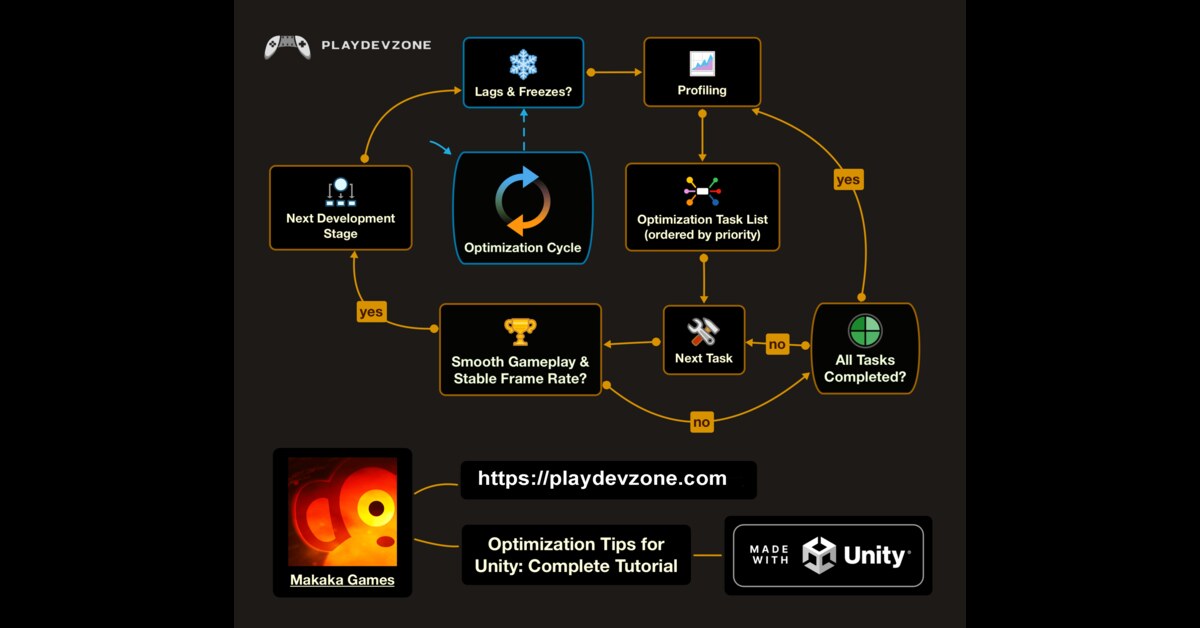
Profiling tools in Unity help identify bottlenecks, so you can target the areas that matter most (Polishing and optimizing Unity games).
By focusing on performance, you don’t just prevent frustration, you enhance immersion, gameplay fluidity, and overall player satisfaction.
With the right approach, even small indie teams can create games that look amazing and run flawlessly, proving that optimization is as much an art as it is a technical skill.
Visual and Audio Enhancements
In game development, it’s often the small touches that leave the biggest impression.
Visual and audio enhancements can transform a good Unity game into an unforgettable experience.
Polished visuals, such as dynamic lighting, smooth animations, particle effects, and detailed textures, immerse players in your world.
Complementing this with high-quality audio, such as adaptive music, realistic sound effects, and spatial audio, elevates gameplay by adding emotional depth and feedback cues.
For indie developers, these enhancements are not about flashy features; they’re about crafting a cohesive, professional-feeling game that resonates with players.
By thoughtfully refining what players see and hear, you create a world that feels alive, engaging, and memorable, proving that even small teams can deliver a truly polished experience.
UX & User Feedback Integration
Great games aren’t just built, they’re experienced. That’s why UX & user feedback integration is a game-changer for indie developers.
A smooth, intuitive interface, responsive controls, and clear in-game guidance can make the difference between frustration and delight.
But the real magic happens when you actively listen to your players. Collecting feedback through playtests, surveys, or analytics gives you insights that no developer intuition can match (Polishing and optimizing Unity games).
Iterating based on this feedback helps you fix pain points, enhance engagement, and craft an experience that resonates deeply with your audience.
For indie creators, this approach turns a good game into one that players love and recommend.
By valuing both UX and player input, you ensure every update brings your game closer to perfection.
Testing and Iteration
In indie game development, a brilliant idea alone isn’t enough; success comes from testing and iteration.
Every playtest, bug fix, and tweak is an opportunity to refine your Unity game and elevate the player experience.
Testing identifies performance issues, gameplay imbalances, and confusing mechanics, while iteration allows you to improve based on real data and feedback.
For indie developers, this cycle of trial, error, and improvement is where polish truly happens (Polishing and optimizing Unity games).
By embracing testing as a creative tool rather than a chore, you transform your game into a smoother, more engaging, and player-loved experience.
Remember: even small, consistent improvements can make your game feel professional, immersive, and unforgettable.
Deployment and Post-Launch Optimization
Releasing your Unity game is just the beginning. Deployment and post-launch optimization ensure that your indie game not only reaches players but continues to perform at its best.
Proper deployment includes platform-specific tweaks, asset management, and testing builds for performance and compatibility.
After launch, monitoring player behavior, analyzing analytics, and applying timely updates allow you to fix issues, improve gameplay, and enhance user satisfaction.
For indie developers, this ongoing refinement turns initial releases into polished, enduring experiences (Polishing and optimizing Unity games).
By embracing post-launch optimization, you demonstrate commitment to your players, increase retention, and elevate your game from a one-time play to a memorable, long-lasting experience.
Thoughtful deployment and continuous improvement are the keys to transforming a great game into a beloved one.
Tools & Resources for Indie Developers
Building a polished Unity game as an indie developer doesn’t have to be overwhelming.
The right tools & resources for indie developers can streamline your workflow, optimize performance, and elevate your game’s quality.
From Unity’s built-in Profiler and Addressables system to powerful Asset Store plugins for animations, lighting, and audio, there’s a wealth of options to save time and enhance creativity.
Online communities, tutorials, and documentation provide guidance, inspiration, and problem-solving strategies that even solo developers can leverage.
By embracing these tools and resources, indie developers can punch above their weight, creating games that feel professional, run smoothly, and captivate players.
The right support system not only boosts efficiency but also empowers you to focus on what matters most: building unforgettable experiences.
FAQ (Frequently Asked Questions)
Is Unity good for indie devs?
Yes! Unity is an excellent choice for indie developers because it combines accessibility, versatility, and powerful features that let small teams or solo creators bring ambitious ideas to life.
Its user-friendly interface, extensive documentation, and active community make learning and problem-solving much easier, even for beginners.
Unity supports 2D, 3D, VR, and mobile game development, giving indie devs the flexibility to explore any genre or platform (Polishing and optimizing Unity games).
Additionally, a rich ecosystem of plugins, assets, and optimization tools helps polish games faster without needing a huge team.
For indie developers looking to turn creative visions into professional, playable experiences, Unity is not just good—it’s empowering.
With persistence and the right resources, you can develop games that feel polished, perform smoothly, and captivate players worldwide.
What is the 80 20 rule in game development?
The 80/20 rule, also known as the Pareto Principle, is a powerful concept in game development: roughly 80% of your game’s value comes from 20% of its features.
For indie developers, this means focusing on the core mechanics and experiences that truly engage players, rather than trying to perfect every minor detail.
By prioritizing the elements that matter most, polished gameplay loops, smooth controls, and compelling visuals, you can deliver a satisfying, professional experience without getting lost in endless tweaks.
Applying the 80/20 rule also streamlines development, speeds up iteration, and reduces burnout, all of which are crucial for small teams (Polishing and optimizing Unity games).
Understanding this principle empowers developers to work smarter, not harder, and ensures that every effort contributes directly to player enjoyment and the game’s success.
How do I optimize my Unity game?
Optimizing your Unity game is about making it run smoothly while delivering the best player experience.
Start by profiling your game using Unity’s built-in tools to identify performance bottlenecks like heavy scripts, excessive draw calls, or memory spikes.
Use techniques such as object pooling, level of detail (LOD) models, and texture compression to reduce strain on the CPU and GPU.
Streamline animations, audio, and particle effects without sacrificing visual quality.
For mobile or lower-end devices, consider resolution scaling and adaptive quality settings (Polishing and optimizing Unity games).
Equally important are iterative testing, regular performance monitoring, gathering player feedback, and refining critical areas.
By focusing on these optimization strategies, indie developers can create smooth, responsive, and professional-feeling games that captivate players, proving that small teams can achieve big results.
How much do AAA game devs make?
Salaries in AAA game development vary widely depending on role, experience, and studio location.
Entry-level positions, such as junior programmers or QA testers, typically earn between $50,000 and $70,000 per year, while experienced developers, lead designers, or senior engineers can make $90,000 to $150,000+ annually. Specialized roles like technical artists, AI programmers, or network engineers may earn even more.
Bonuses and profit-sharing are common at large studios, further increasing potential earnings.
For indie developers, this might seem aspirational, but understanding AAA salaries can inspire goal-setting and skill development (Polishing and optimizing Unity games).
By building strong portfolios, mastering tools like Unity or Unreal Engine, and honing creative and technical expertise, indie devs can aim for similar success, whether in AAA studios or by launching their own games independently.
How much do AAA game devs make?
Unity’s longtime CEO, John Riccitiello, stepped down in late 2023 largely because a major pricing decision triggered widespread backlash from the game development community.
The company announced a controversial “Runtime Fee” that would charge developers based on the number of game installations, a move many creators found unfair, unclear, and threatening to their business models.
The outcry was swift and intense, hurting Unity’s reputation and trust with developers (Polishing and optimizing Unity games).
Unity eventually reversed course on the fee, but the damage to goodwill was significant, prompting leadership change as the company sought renewed confidence from users and investors.
Unity’s board appointed a new CEO to guide the company forward with a more community‑focused approach and rebuild goodwill with developers.
Conclusion
Creating a memorable Unity game isn’t just about coding mechanics; it’s about polishing and optimizing every aspect to deliver a seamless, engaging player experience.
This Indie Developer Guide to Polishing and Optimizing Unity Games has shown that even small teams or solo developers can achieve professional-quality results by focusing on visuals, audio, performance, UX, testing, and post-launch iteration.
By prioritizing what truly matters, gathering player feedback, and using the right tools and resources, indie developers can transform their games from “playable” to “unforgettable.”
Remember, polish is about the details, optimization is about performance, and together they create experiences that captivate players and leave lasting impressions (Polishing and optimizing Unity games).
With dedication, creativity, and smart workflow strategies, you can turn your Unity project into a polished masterpiece that rivals big studios, proving that indie devs can make games that truly shine.